Table of Contents
Nonaki is a WordPress plugin for managing and cloaking affiliate links. Version 1 covered the basics - create a link, pick a key, redirect. Version 2 adds analytics, link health checks, tags, import/export, and a REST API.
What's new at a glance
- Click and impression tracking with device, country, browser, and referrer data
- Link health checker with email alerts
- Tags for organising links
- Trash and restore
- Import and export (CSV and JSON)
- REST API for external integrations
- Fully redesigned admin interface
Analytics
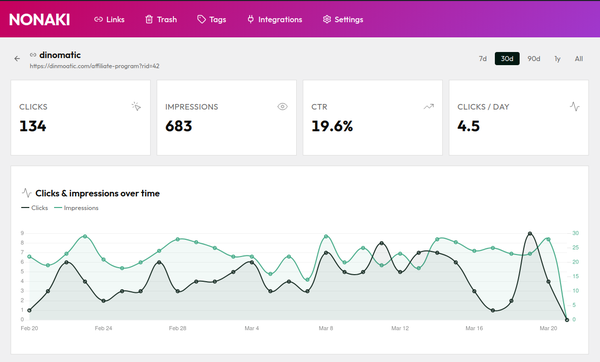
Every click on your links is now recorded - device type, browser, operating system, country, and referrer. Impressions are tracked separately, so you can see how many people viewed a page with your link versus how many actually clicked.
Bots are detected and filtered automatically, so the numbers reflect real visitors.
All data is stored in your own WordPress database.
Tags
You can now create tags and assign them to links. Useful once you have more than a handful of links and want to filter by campaign, category, or whatever makes sense for your setup.
Link health checker
Nonaki checks your destination URLs on a regular schedule. If a link gets broken - product discontinued, URL changed, website offline - it gets flagged in the dashboard and you get an email. The check follows redirects, so a link that redirects to a working page is not flagged.
Import and export
You can import links from a CSV or JSON file. Duplicates are skipped automatically. Export works the same way - one click to get a full backup of all your links and tags.
This is useful if you're migrating from another plugin or custom solution, or just working from a spreadsheet.
REST API
Nonaki now has a REST API for pulling click and impression data into external tools. You generate an API key in the plugin settings and use it to authenticate requests. Full documentation is in the docs.
Upgrading from v1
Two things to do before updating:
1. Check your PHP version. Nonaki 2.0 requires PHP 8.4. Check your hosting control panel or ask your host if you're unsure.
2. After updating, deactivate and reactivate the plugin. This runs a one-time migration that carries your existing links over to the new database structure. Nothing is deleted.
Read the documentation for more details.
Nonaki is completely free, download Nonaki version 2.0 →

Written by Levon, Founder of DinoMatic
Hey, I'm Levon - a web developer who loves helping gambling and Forex affiliates build fast, SEO-friendly websites that convert. I've created WP themes like Spinoko, Akurai, and FXT, designed for lean setups that don't compromise on performance or rankings. I write from hands-on experience - I test, tweak, and share what works.