Table of Contents
Version 1.5.0 of FXT - the forex broker affiliate theme - adds a few things that have been on the wishlist for a while: proper support for multiple affiliate links per broker, a dashboard widget to keep tabs on your brokers at a glance, and a new Integrations page. Here's what changed and how to use it.
Multiple Affiliate Links
Previously each broker had one primary affiliate link — the Trading Account Link. That works fine if you have a single offer for each broker, but it falls short when you need different links for different contexts. For example, you might want a crypto-specific link for one listing block and a CFD link for another, both pointing to the same broker.
This release adds support for up to 10 named affiliate link groups alongside the existing Trading Account Link.
How to set it up:
Open any broker's edit page. You'll see a new tab called "Affiliate Links" below "Basic Information" in fields on every broker page. You'll see the Trading Account Link and Demo Account Link field here along with 10 more affiliate link fields. Fill in the ones that you use, no need to fill them all.
Go to FXT Options → Affiliate Links. You'll see 10 label fields. Give a name to each label you want to use - for instance, "Crypto" or "CFD". Any link you leave blank simply won't appear in listings. Save.
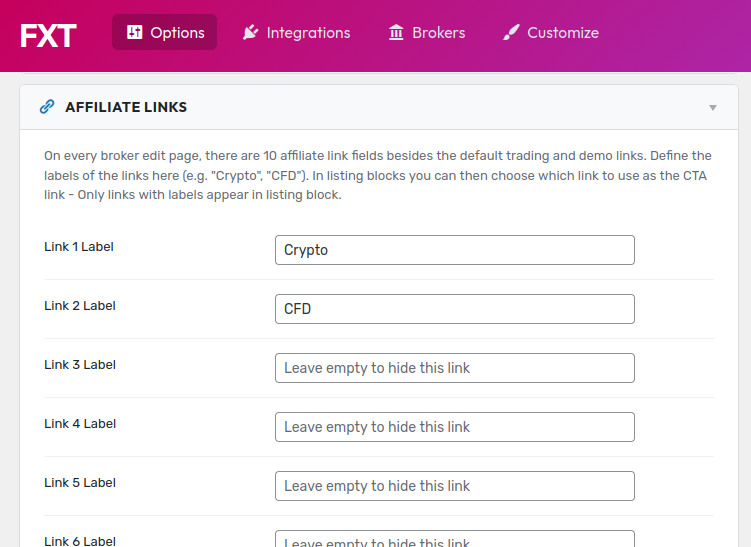
How to use it in listing blocks:
When you add or edit a listing block in the page editor, you'll now see a dropdown to choose which affiliate link to use as the call-to-action for that specific block. The options in that dropdown are "Default (Trading Account Link)" plus whatever labels you've added. Pick the one that makes sense for that block.
If a broker doesn't have a URL set for the link you chose, it automatically falls back to the Trading Account Link, so nothing breaks if some brokers haven't been updated yet.
Dashboard Widget
There's a new widget on the WordPress admin dashboard that gives you a quick overview of your broker data without having to navigate anywhere.
It shows three numbers at the top: total brokers, published, and drafts. Each is a link that takes you directly to the filtered list.
Below that are quick-action buttons: + New Broker, Theme Options, and Integrations.
The more useful part is below those: if any published broker is missing its logo, overall rating, or account link, it appears in an Incomplete Broker Data list with a direct edit link. This makes it easy to catch brokers that went live with something missing, without having to audit them manually.
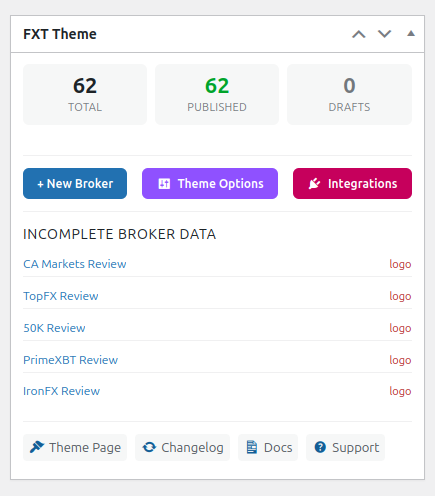
If your FXT license has expired, a warning appears in the widget with a link to manage it.
The bottom of the widget has links to the theme page, changelog, documentation, and support.
Integrations Page
There's a new Integrations page under the FXT menu in WordPress admin. It documents other tools that work with FXT. Two are listed in this release:
tablrr - If you manage multiple FXT sites, tablrr is worth looking at. Instead of logging into each WordPress admin separately to update a broker's data, you manage everything from one tablrr dashboard and the changes sync across all your connected sites automatically. This covers both listing tables and full broker review pages. You can also control which brokers appear on which sites from that single account.
Nonaki — A free WordPress plugin for link cloaking and management, by DinoMatic. It lets you create branded redirect links (e.g. yourdomain.com/go/broker-name) with click tracking broken down by device, browser, country, and referrer. It also monitors your destination URLs and emails you if one breaks. Everything runs inside your own WordPress dashbaord - no external accounts or monthly fees.
Admin Options Header
The FXT Options panel got a small visual refresh - updated typography and a cleaner layout. Nothing functional changed, it just looks better.
That covers 1.5.0 version. The affiliate links feature is the most involved one to configure, but once the labels are set in options and the broker URLs are filled in, the listing block dropdown handles everything from there.
For questions or issues, open a support ticket.

Written by Levon, Founder of DinoMatic
Hey, I'm Levon - a web developer who loves helping gambling and Forex affiliates build fast, SEO-friendly websites that convert. I've created WP themes like Spinoko, Akurai, and FXT, designed for lean setups that don't compromise on performance or rankings. I write from hands-on experience - I test, tweak, and share what works.